





National Casino App
Explore the National Casino mobile app for Canadian players on iOS and Android. Learn how to install, navigate, and enjoy betting on the app whenever you want, wherever you are.
Join NowOnline casinos have changed the way people experience gambling. Mobile apps have pushed this evolution even further. For years, desktop platforms served players reliably. Today, dedicated mobile apps bring unmatched convenience to the table.
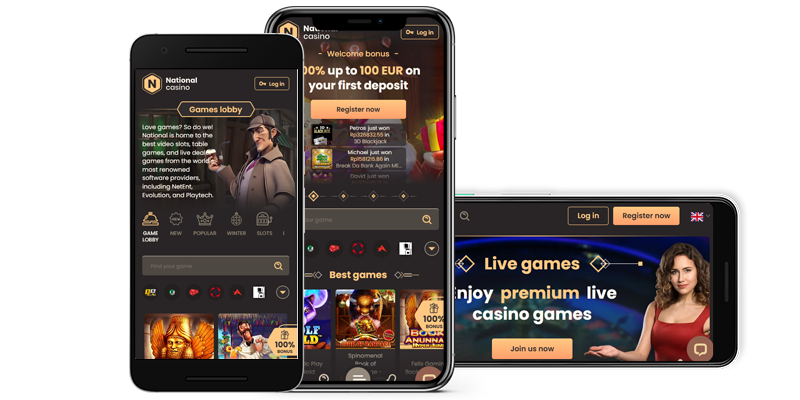
National Casino delivers a functional and well-designed mobile application. The app runs on iOS and Android devices alike. It also features a fully responsive web version. Canadian players enjoy the full website experience through the app. They also gain faster gameplay, stronger performance, and quicker access.
Wondering if this app belongs on your device? Stick around for a few minutes. We’ll break down the app’s features, guide you through installation, and answer popular questions.
How to Download & Install
The National Casino app provides everything required for a solid gambling session. Here’s how to set up the app on your iOS or Android device.
Installing on Android Devices:

- Download the app from the website footer or get it directly from the Google Play Store.
- On the website, tap the Mobile App button at the bottom. This sends you to the Google Play Store.
- Press “Install” and the app downloads automatically.
- Open the app, type in your login details, and begin betting.
- Some Android phones may not redirect to the Play Store. You might need to enable “Install from Unknown Sources.” Go to your device settings and turn this on before completing the installation.
 Download
 the android app
The app provides access to multiple betting options through a straightforward interface. Some Canadian users find the app unavailable in their area. This is a Google restriction, but a solution exists. You can grab the app directly from the National Casino website. First, complete step 5 to confirm you can install apps from unknown sources. Then visit the National Casino site to download and install the app.
If the installation fails, verify your Android version is up to date. Also make sure your device has adequate storage space.
Installing on iOS Devices:

- Launch the App Store on your Apple device.
- Look up National Casino and select the official app.
- Tap “Get” to start the download and installation.
- Open the app, log in with your account credentials, and start playing.
 Download
 the IOS app
If installation doesn’t work, confirm your iOS version supports the app. Also ensure your device has sufficient storage.
App Features & Benefits
Anyone familiar with the National Casino web platform knows the site prioritizes user experience. The app delivers identical bonuses and promotions. But it performs faster, feels smoother, and offers better security.
There’s much to like about the National Casino mobile app. Here’s what makes the app stand out:
Convenience
Imagine opening an app right from your home screen. No need to type a website address into a browser. This is exactly what National Casino offers Canadian players.
This ease means you won’t spend time waiting for features to load. You also won’t need to type passwords over and over. That brings us to the next highlight.
One-Click Login Process
This might seem small to some users. But others will value not entering credentials every session. With the mobile app, you bypass the password step after your initial login. Enter your details once when you first launch the app. After that, you get in without any fuss.
Mobile Optimization
Whether you run iOS or Android, National Casino designed this app for both systems. The aim is a fluid, responsive, and engaging experience on either platform.
You’ll experience faster refresh rates across all games. The layout makes switching between games simple. On the desktop version, you often wait for pages to load before taking action. Sometimes you need to clear browser cache when it becomes full.
The optimised mobile app sidesteps these issues. There’s no congestion or sluggish reload times, unless an update awaits. It’s everything you need for quality betting on the move.
Improved Security
Security is a top priority for online gamblers. Nobody wants their account breached or personal data shared with outside parties. The good news is the National Casino app handles this well.
The app employs advanced encryption to safeguard payment and financial information. This makes the app more secure and lowers data exposure risks. Canadian players can deposit and withdraw with peace of mind.
Exclusive Features
The bonuses and promotions match what’s available on the website. But the app includes special features like push notifications. This keeps you informed about new bonuses and promotions without needing to log in.


App Requirements & Compatible Devices
The National Casino app performs well on most modern smartphones and tablets. Older devices may not support the app if they fall below minimum specifications.
Certain operating system versions and hardware specs could stop your phone from running the app. Verify your device meets these requirements before installing.
Minimum Requirements for Android
- Android OS: Version 5.0 (Lollipop) or higher
- RAM: 2GB minimum required
- Storage: The app takes up roughly 150MB, but you’ll need about 1GB free for smooth operation
- Processor: A quad-core chip or better works best
If your Android version is outdated, update it when possible. Otherwise, use the mobile web version or consider a newer phone. Most modern Android smartphones from Samsung, Xiaomi, HMD, Oppo, and Google Pixel run the app without trouble. These brands remain popular choices among Canadian users.
Minimum Requirements for iOS
The National Casino App performs smoothly on most Apple smartphones. Your device still needs to meet minimum requirements for optimal performance.
- iOS Version: 12.0 or any later release
- Supported Devices: iPhone 7 and above, iPad 5th generation and above
- Storage: The app weighs around 200MB, though 1GB of free space ensures proper functionality
If your device meets these requirements, you’re ready. You might notice lag even with an updated device. Don’t stress—check if the app requires an update.
National Casino releases regular updates at no extra charge. These updates maintain smooth performance. Keep in mind the app may grow larger with each update. Ensure you have enough space before installing updates.
Mobile Web Version
If your Android or iOS device doesn’t meet the requirements above, the mobile web version serves as an alternative. Some players actually favour the web version over the mobile app, and that’s fine. The National Casino mobile web version provides a reliable option for those who prefer browser-based gambling.
As noted earlier, the web version has some limitations. You’ll need to enter login details each session. You won’t receive push notifications for new bonuses and promotions. But the web version still does its job well.
The mobile app only functions on mobile devices. The web version lets you reach your betting account from a phone or desktop. The convenience factor drops slightly. But you can access your account from any device as long as you remember your login credentials. This flexibility appeals to many Canadian players who move between devices.
Join NowFrequently Asked Questions (FAQ)
Is the National Casino app safe?
Does National Casino have an app and a mobile web version?
How do I download the National Casino App if it’s unavailable on the Google Play Store or App Store?
Does the National Casino App have exclusive bonuses?
What if the app refuses to install on my device?
Responsible Gaming

National Casino takes responsible gaming seriously. The platform provides several tools designed to keep betting safe and enjoyable. Self-exclusion options let players temporarily block access to their accounts when needed. Deposit limits give you control over how much you spend. Canadian players looking for additional guidance can visit the Responsible Gaming page on the National Casino website.